Search Engine Optimization (SEO) has become more competitive than ever. Whether you’re a blogger, digital marketer, SEO professional, agency owner, or website developer, using the right SEO tools can save hours of manual work while improving your website’s visibility on Google.
One of the easiest ways to improve your SEO workflow is by installing Chrome extensions. These lightweight tools work directly inside your browser and help you analyze websites, audit pages, research keywords, inspect backlinks, monitor competitors, and optimize local SEO without switching between multiple platforms.
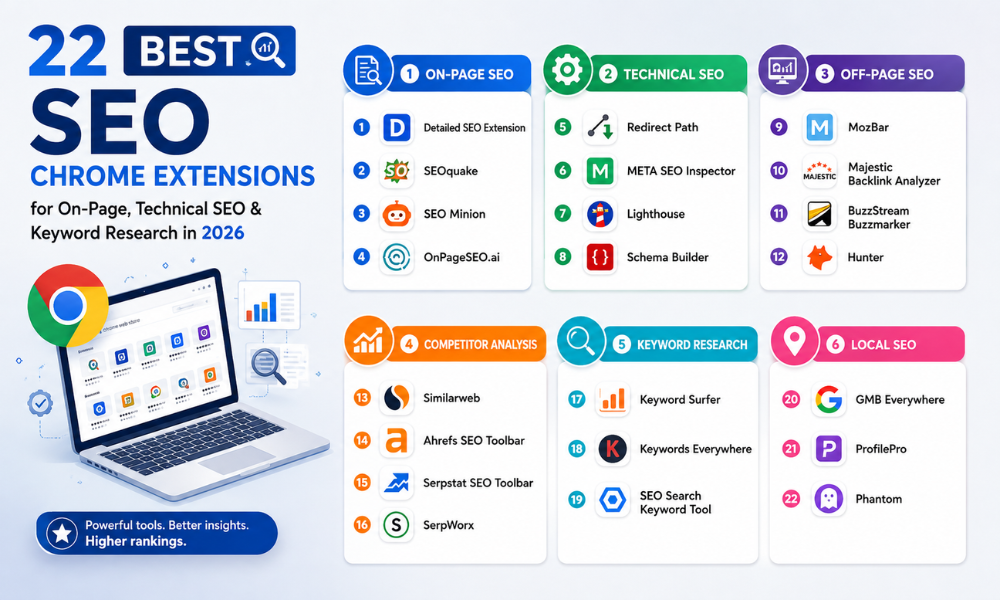
The list below, inspired by the uploaded infographic, covers 22 of the best SEO Chrome extensions grouped into six essential categories: On-Page SEO, Technical SEO, Off-Page SEO, Competitor Analysis, Keyword Research, and Local SEO.
-
On-Page SEO Chrome Extensions
These extensions help optimize individual web pages for better search engine rankings.
- Detailed SEO Extension
Detailed SEO is one of the most popular on-page auditing tools. It instantly displays important SEO elements such as page titles, meta descriptions, headings, canonical URLs, structured data, and indexing information.
Best for:
- Quick SEO audits
- Meta tag analysis
- Heading structure review
- SEOquake
SEOquake provides valuable SEO metrics for any webpage, including page indexing, keyword density, backlinks, internal links, and domain statistics.
Key Features
- SEO audit
- SERP overlay
- Keyword density checker
- Internal link analysis
- SEO Minion
SEO Minion simplifies daily SEO tasks.
It allows users to:
- Check broken links
- Preview SERP snippets
- Analyze on-page SEO
- Verify hreflang tags
This extension is especially useful during technical website audits.
- OnPageSEO.ai
OnPageSEO.ai uses AI-powered recommendations to improve page optimization.
It can suggest improvements for:
- Content structure
- Keyword usage
- SEO optimization
- User experience
-
Technical SEO Chrome Extensions
Technical SEO ensures search engines can properly crawl and index your website.
- Redirect Path
Redirect Path identifies HTTP status codes such as:
- 301 Redirect
- 302 Redirect
- 404 Errors
- 500 Server Errors
This extension is extremely useful when auditing migrated websites.
- META SEO Inspector
META SEO Inspector checks whether important HTML tags are properly implemented.
It analyzes:
- Meta title
- Meta description
- Open Graph tags
- Twitter Cards
- Structured metadata
- Lighthouse
Developed by Google, Lighthouse audits website quality in several areas.
It measures:
- Performance
- Accessibility
- Best Practices
- SEO
- Core Web Vitals
This tool is essential for technical SEO professionals.
- Schema Builder
Schema Builder simplifies structured data implementation.
It helps create schema markup for:
- Articles
- Local Business
- Products
- FAQs
- Events
Proper schema can improve search result appearance through rich snippets.
-
Off-Page SEO Chrome Extensions
Backlinks remain one of Google’s strongest ranking factors.
These tools simplify backlink analysis and outreach.
- MozBar
MozBar displays important domain metrics directly in your browser.
It includes:
- Domain Authority (DA)
- Page Authority (PA)
- Spam Score
- Link metrics
Perfect for quickly evaluating website quality.
- Majestic Backlink Analyzer
Majestic focuses on backlink intelligence.
It provides:
- Trust Flow
- Citation Flow
- Referring Domains
- Backlink Profiles
Ideal for link-building campaigns.
- BuzzStream Buzzmarker
Buzzmarker streamlines outreach campaigns.
SEO professionals can:
- Save prospects
- Organize outreach
- Manage relationships
- Build backlinks efficiently
- Hunter
Hunter helps locate professional email addresses associated with websites.
This makes outreach easier for:
- Guest posting
- Digital PR
- Link building
- Partnership opportunities
-
Competitor Analysis Extensions
Understanding competitors often reveals new SEO opportunities.
- Similarweb
Similarweb estimates website traffic and audience insights.
You can view:
- Traffic sources
- Top countries
- User engagement
- Referral websites
Excellent for market research.
- Ahrefs SEO Toolbar
Ahrefs offers instant SEO insights without opening the main platform.
It displays:
- Backlinks
- Referring domains
- HTTP status
- Indexability
- Meta information
A must-have extension for experienced SEO professionals.
- Serpstat
Serpstat combines several SEO features into one browser extension.
It provides:
- Keyword data
- Domain analysis
- Competitor insights
- PPC information
- SerpWorx
SerpWorx enhances Google search results by displaying SEO metrics directly inside SERPs.
It helps compare competing websites without opening multiple tabs.
-
Keyword Research Extensions
Every successful SEO strategy begins with keyword research.
- Keyword Surfer
Keyword Surfer shows keyword search volume directly inside Google Search.
Additional features include:
- Similar keywords
- Estimated traffic
- Content suggestions
Perfect for content creators.
- Keywords Everywhere
Keywords Everywhere remains one of the most popular keyword research extensions.
It displays:
- Monthly search volume
- CPC
- Competition
- Related keywords
- Long-tail suggestions
Ideal for SEO and PPC planning.
- SEO Search Keyword Tool
This extension helps identify important search terms used on webpages.
Useful for:
- Competitor research
- Content optimization
- Keyword placement
-
Local SEO Extensions
Local businesses require specialized SEO tools.
- GMB Everywhere
GMB Everywhere helps analyze Google Business Profiles.
It provides valuable insights including:
- Business categories
- Reviews
- Profile optimization
- Local SEO opportunities
Excellent for local marketing agencies.
- ProfilePro
ProfilePro focuses on Google Business Profile optimization.
It offers recommendations to improve:
- Local visibility
- Profile completeness
- Business information
Helpful for businesses targeting local customers.
- Phantom
Phantom performs detailed Google Business Profile audits.
Its features include:
- Local SEO analysis
- GBP health checks
- Optimization suggestions
- Business listing insights
A useful addition for local SEO professionals.
Why Should You Use SEO Chrome Extensions?
Instead of opening multiple SEO tools every day, Chrome extensions allow marketers to analyze websites instantly while browsing.
They help save time by:
- Auditing pages in seconds
- Finding keyword opportunities
- Detecting technical issues
- Monitoring competitors
- Checking backlinks
- Optimizing local SEO
- Improving website performance
Choosing the Right Extensions
Not every SEO professional needs all 22 extensions. Installing too many browser extensions can slow down Chrome and affect productivity. Instead, build a toolkit based on your daily tasks.
Recommended combinations:
For Content Writers
- Keyword Surfer
- Keywords Everywhere
- Detailed SEO
- SEO Minion
For Technical SEO Experts
- Lighthouse
- Redirect Path
- META SEO Inspector
- Schema Builder
For Link Building
- MozBar
- Majestic Backlink Analyzer
- Hunter
- BuzzStream Buzzmarker
For Competitor Research
- Similarweb
- Ahrefs SEO Toolbar
- Serpstat
- SerpWorx
For Local SEO Agencies
- GMB Everywhere
- ProfilePro
- Phantom
Pro Tips Before Installing
- Install only the extensions you use regularly.
- Disable unused extensions to keep Chrome fast.
- Keep extensions updated for the latest features and security improvements.
- Verify permissions before installing any browser extension.
- Combine Chrome extensions with professional SEO platforms like Google Search Console, Google Analytics, Ahrefs, Semrush, or Screaming Frog for more comprehensive insights.
Final Thoughts
The right browser extensions can significantly improve your SEO workflow by making audits, keyword research, competitor analysis, backlink checks, and local optimization faster and more efficient. The 22 SEO Chrome extensions featured above cover every major aspect of search engine optimization—from on-page improvements and technical audits to keyword discovery, backlink analysis, competitor research, and Google Business Profile optimization.
Whether you’re a beginner learning SEO or an experienced digital marketer managing multiple websites, building a smart toolkit with these extensions can save time, improve productivity, and help you make better data-driven SEO decisions. Instead of installing every available extension, choose the ones that best match your workflow and keep your browser optimized for peak performance.